

Royal Wardrobe Designer
Reviews
Royal Wardrobe Designer stands out for its stress-free approach to fashion play. The variety of dresses, hairstyles, and accessories allows for many unique combinations, and the castle scenes add a charming backdrop. The save feature is handy for collecting favorites. It is an excellent choice for children who enjoy imaginative styling without any pressure.
About This Game
Creative Freedom Without Pressure
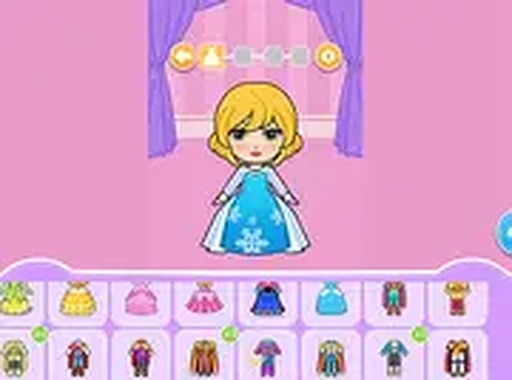
Royal Wardrobe Designer offers a relaxed space where players can experiment with various clothing pieces and accessories. There is no time limit or scoring system, so everyone can take as long as they like to find the perfect combination. The focus is on personal expression and enjoying the process of styling a character.Wardrobe Selection & Mixing
Players begin by choosing from a collection of dresses, each with its own color and design. After selecting an outfit, the next step is picking a hairstyle that complements the look. Crowns, necklaces, and other decorative items can be added to finish the ensemble. The game encourages trying unexpected pairings to see what works.Castle Scenes & Posing
Once the outfit is complete, the princess can be placed in one of several castle-themed backgrounds. These scenes provide a royal setting for the character. Players can adjust the pose of the princess to create a pleasing composition before saving the image.Saving & Sharing Creations
The game includes a simple save feature that lets players keep their favorite designs. These saved looks can be revisited later for inspiration or to compare with new creations. While sharing options are available, the primary function is building a personal gallery of styles.Accessible on Any Device
Royal Wardrobe Designer runs directly in a web browser without requiring any downloads or installations. The controls are optimized for both mouse and touch input, making it easy to play on desktop computers, tablets, or smartphones. This convenience allows players to jump into the activity quickly.Compatibility
▸ Desktop: Chrome / Edge / Firefox / Safari
▸ Mobile: iOS Safari / Android Chrome
▸ Tablet: iPadOS Safari / Android Tablet Browser
Keep your browser updated for the best experience
Faq
Can I play Royal Wardrobe Designer on a tablet?
Yes, the game is designed to work on tablets and smartphones. The touch-friendly controls let you tap and drag to select outfits, hairstyles, and accessories just as easily as using a mouse on a computer.
Is there any way to save my favorite outfits in Royal Wardrobe Designer?
Yes, the game includes a save function that captures a snapshot of your princess in the castle scene. You can store multiple looks and view them later to see how your style choices have evolved.
Do I need to create an account to play Royal Wardrobe Designer?
No account is required. The game loads instantly in your browser and you can start styling right away. Saved images are stored locally on your device for convenience.
What age group is Royal Wardrobe Designer suitable for?
The game is designed for children and families. The simple controls, gentle pace, and lack of competitive elements make it appropriate for young players who enjoy creative activities.
Are there any in-app purchases or advertisements in Royal Wardrobe Designer?
The game is free to play and does not include any in-app purchases. Some versions may display non-intrusive ads, but the core experience remains uninterrupted and family-friendly.
Can I change the princess's pose after selecting a background?
Yes, you can adjust the princess's pose even after choosing a castle scene. This flexibility lets you experiment with different stances to find the most visually appealing composition for your outfit.










Comments
0 comments