

Piano Play Music Studio
Reviews
Piano Play Music Studio is an excellent free tool for anyone interested in music creation. It transforms a standard computer keyboard into a playable piano with multiple sound options. The interface is clean and intuitive, making it accessible for all ages. Octave switching and different piano types add variety. Ideal for learning, relaxing, or just having fun with sound.
About This Game
Game Introduction
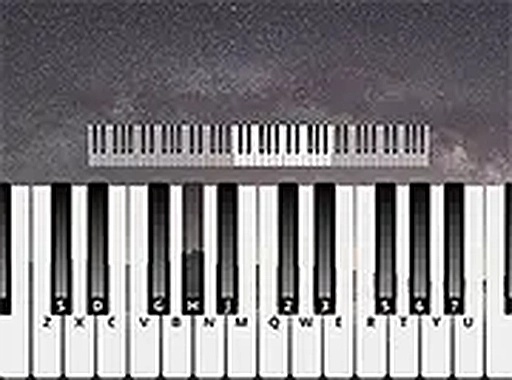
Piano Play Music Studio is a free online music experience that allows anyone to produce sounds and melodies using a standard computer keyboard. Designed for players of all ages and backgrounds, it provides a straightforward way to engage with music creation without needing a physical instrument or any prior training. The entire experience runs directly in a web browser, so there is no software to download or install. Whether the goal is to learn basic music concepts, unwind with calming tones, or simply have fun experimenting with sound, this virtual piano offers an accessible and enjoyable platform. Its core objective is to make music creation easy and immediate, removing barriers such as cost, complexity, and the need for specialized equipment. By mapping keyboard keys to musical notes, the tool lets anyone start playing right away, encouraging creativity and exploration. The interface is clean and intuitive, focusing on the joy of making music rather than on scores or competition.
How to Play
To begin, open the game in any modern web browser. The screen displays a visual representation of a piano keyboard with labeled keys. Players press corresponding keys on their computer keyboard to produce notes. Single notes can be played, or multiple keys can be pressed together to form chords. Buttons are available to shift the keyboard range up or down by octaves, giving access to a wider set of notes. A settings menu allows players to select different piano sound types, such as grand piano or electric piano, changing the instrument’s tone. The game works on both desktop and mobile devices, and a full-screen option is available for a more focused experience. There are no timers, scores, or penalties, so each person can play at their own pace, experiment freely, and enjoy the process of creating music.
Game Features
Key features include a keyboard binding system that maps each computer key to a specific musical note, enabling easy play. Octave switching extends the range of available notes, allowing for more complex melodies. Multiple piano types offer varied sounds, such as grand piano or electric piano, giving players tonal variety. The game requires no downloads and functions in any modern browser, ensuring broad accessibility. A full-screen mode enhances the playing environment by reducing distractions. The design is suitable for all ages and skill levels, making it a versatile tool for both beginners and experienced players looking for a convenient practice instrument.
Tips for Success
This tool provides a simple way to explore music creation without cost or complexity. It is ideal for short breaks, learning basic music concepts, or relaxing with pleasant sounds. The straightforward design lets players focus on playing and enjoying their own compositions. Regular practice can help improve timing and coordination. Experimenting with different octaves and piano types can lead to discovering new sounds. Most importantly, have fun and let creativity guide the experience.









Comments
0 comments